


The BTZO Convert feature is the easiest way to instantly swap one cryptocurrency for another on the btzo crypto trading platform. Instead of using confusing charts, you just pick what you have and what you want, see the price, and click a button. It’s the best crypto converter for quick and simple trades. Here’s how to use btzo convert in a few easy steps.
Introduction
Trying to trade crypto on a normal exchange can feel like you need a degree in finance. All those charts, order books, and weird terms make a simple swap feel way more complicated than it should be.
What if you could just trade your Bitcoin for Ethereum as easily as buying something online? That’s exactly why BTZO made the Convert feature. It cuts out all the nonsense and lets you swap coins in seconds. This guide will show you how to use it like a pro.
What is BTZO Convert?
BTZO Convert is basically a magic button for swapping crypto. It’s a tool right inside the BTZO platform that lets you trade one coin for another without ever going to the complicated trading screen.
Here’s what makes it different from normal trading:
- It’s Instant: You click a button and the trade is done. No waiting.
- No Confusing Stuff: There are no order books, limit orders, or charts to figure out.
- You See Exactly What You Get: Before you confirm, it shows you the exact amount of the new crypto you’ll receive. No surprises.
Think of it like a currency exchange at the airport. You see the rate, you agree to it, and you get your money. Simple.
Why Use BTZO Convert? Key Benefits
So why should you use this instead of the normal trading page? Here are the best reasons:
- It’s Super Easy: If you can use a vending machine, you can use BTZO Convert. It’s that simple.
- It’s Crazy Fast:The swap happens literally the second you click the button.
- Perfect for Beginners: It’s the best way to start trading without getting overwhelmed.
- No Stress: You don’t have to worry about your order not filling or getting a bad price. The price you see is the price you get.
- Great for Small Trades: It’s perfect for swapping 20 USDT, 50 USDT , or 100 USDT into a different coin quickly.
Step-by-Step Guide: How to Use BTZO Convert
Using this feature is so easy. Just follow these steps:
1. Log In & Find Convert:
Open your BTZO account and log in. Look for the “Convert” button when you click on the “Trade” which is available in the top of your dashboard. It’s usually right on the main screen.
2. Choose Your Coins:
You’ll see two boxes.
- In the first box (“From” or “You Pay”), choose the crypto you have (like USDT).
- In the second box (“To” or “You Receive”), choose the crypto you want (like BNB).
3. Type the Amount:
Type how much you want to swap. The platform will instantly show you how much BNB you’ll get for your USDT.

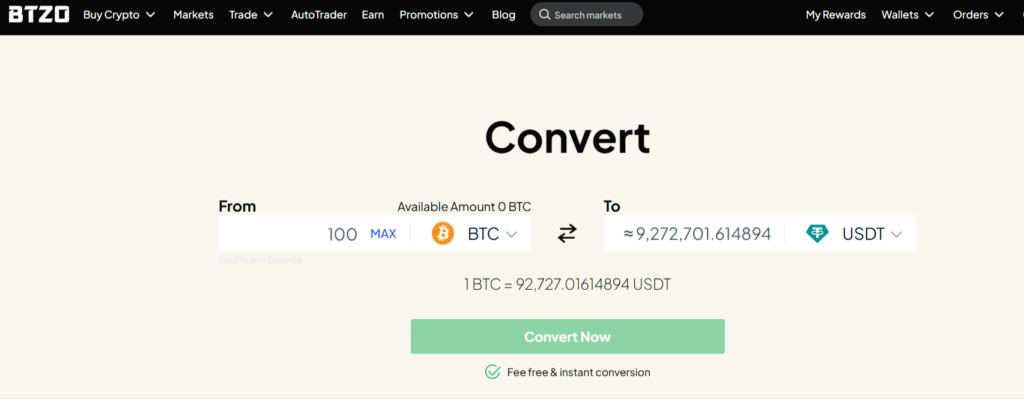
4. Check the Price:
Take one second to look at the numbers and make sure you’re happy with the amount.
5. Click “Convert Now”:
Hit the button! That’s it.
You’re Done! The app will take the crypto from the first box and put the new crypto right into your wallet. The whole thing takes 10 seconds.
Pro Tips for Using BTZO Convert
Here’s how to be a smart user of the Convert feature:
- Best for Small/Medium Trades:
It’s perfect for most normal-sized trades. If you’re moving thousands of dollars, you might get a slightly better price on the advanced trading screen.
- Always Double-Check:
Always look at the amount you’re getting before you click confirm. Just a quick glance!
- It’s Free:
You might pay a little more than the absolute best possible price in other trading platforms. But guess what, BTZO never charges even a single penny for any amount of conversion coins.
- Use It to Take Profits:
Made some profit? Use Convert to quickly change your gains into a stablecoin like USDT to lock it in.
- If You’re New, Start Here:
This is the perfect place to get comfortable with trading before you try the advanced stuff.
Final Thoughts
The BTZO Convert feature is literally the easiest way to trade crypto. It turns a confusing process into a one-click action. Whether you’re a total beginner or just in a hurry, it’s the perfect tool for the job.
Now you know exactly how to use it. No more being scared to swap your coins!
Next time you need to trade, open BTZO App and try the Convert button. It’s the simplest swap you’ll ever make.