


To view your BTZO assets status, simply log in to your mobile or website account and navigate to the “Wallet” section. The latter will give you an in-depth report of your total balance, holdings of individual coins, and value of assets. Keeping a close eye on your BTZO assets is the initial step towards effective management of your crypto assets, and the platform makes this transparent and manageable.
What Is Assets Status on BTZO?
Your “Assets Status” on BTZO is your financial command center. It’s a real-time snapshot of your entire crypto portfolio on the exchange. Understanding the different numbers you see here is key to knowing exactly where you stand.
Think of it as your crypto bank statement, but updated live. The dashboard consolidates all your holdings into one user-friendly view, so you don’t have to jump between different pages to get the full picture. When we talk about your BTZO assets status, we’re typically referring to a few key figures:
Total Balance:
This is the total value of all the cryptocurrencies you hold in your BTZO wallet, converted into your preferred currency (like USD or USDT). It’s your net worth on the platform.
Available Balance:
This is the amount you can use right now for trading, withdrawing, or converting. It’s your “spendable” cash.
Frozen or Locked Balance:
These are funds that are currently being used and are not available for other actions. This can happen if you have open orders, are staking coins, or have allocated margin for futures trades.
Positions (in Futures):
If you trade futures, your assets status also relates to the value and margin tied up in your open positions. This helps you understand how much of your capital is at risk in active trades.
BTZO’s dashboard is built to give you this information at a glance, helping you make informed decisions without any confusion.
How to View Your Assets on BTZO
Verifying your portfolio on BTZO is simple, either via the website or using the BTZO mobile application. Follow these easy-to-follow instructions to see a complete view of your investments.
Step 1: Log in and go to your BTZO account.
First, open the BTZO app on your mobile phone or access the BTZO website. Login to your BTZO account using your login details.
Step 2: Move to the ‘Wallet’ Section
Proceed to the “Wallet” page located on the top navigational menu or in the bottom bar if you are accessing it from a cell phone. Click on it and you may see deposit, withdraw and transfer options in the drop down menu. To continue, click on “Overview”.


Step 3: Review Portfolio Overview
If you select “Overview” you will be taken directly to your wallet main page. This is your portfolio overview. Here, you will likely see:
- Your Total Asset Value, prominently displayed
- Propotion of your total portfolio with percentages (Spot, Futures, Earn and AutoTrader)
- Profit & Loss Analysis, Recent Transactions (Last 7 days)
- A breakdown of your individual cryptocurrencies.


This page gives you the big picture of your BTZO assets.
Step 4: Check Individual Wallet Details (Spot, Futures, Earn and AutoTrader)
BTZO organizes funds into different sub-wallets for clarity. To get a more granular view:
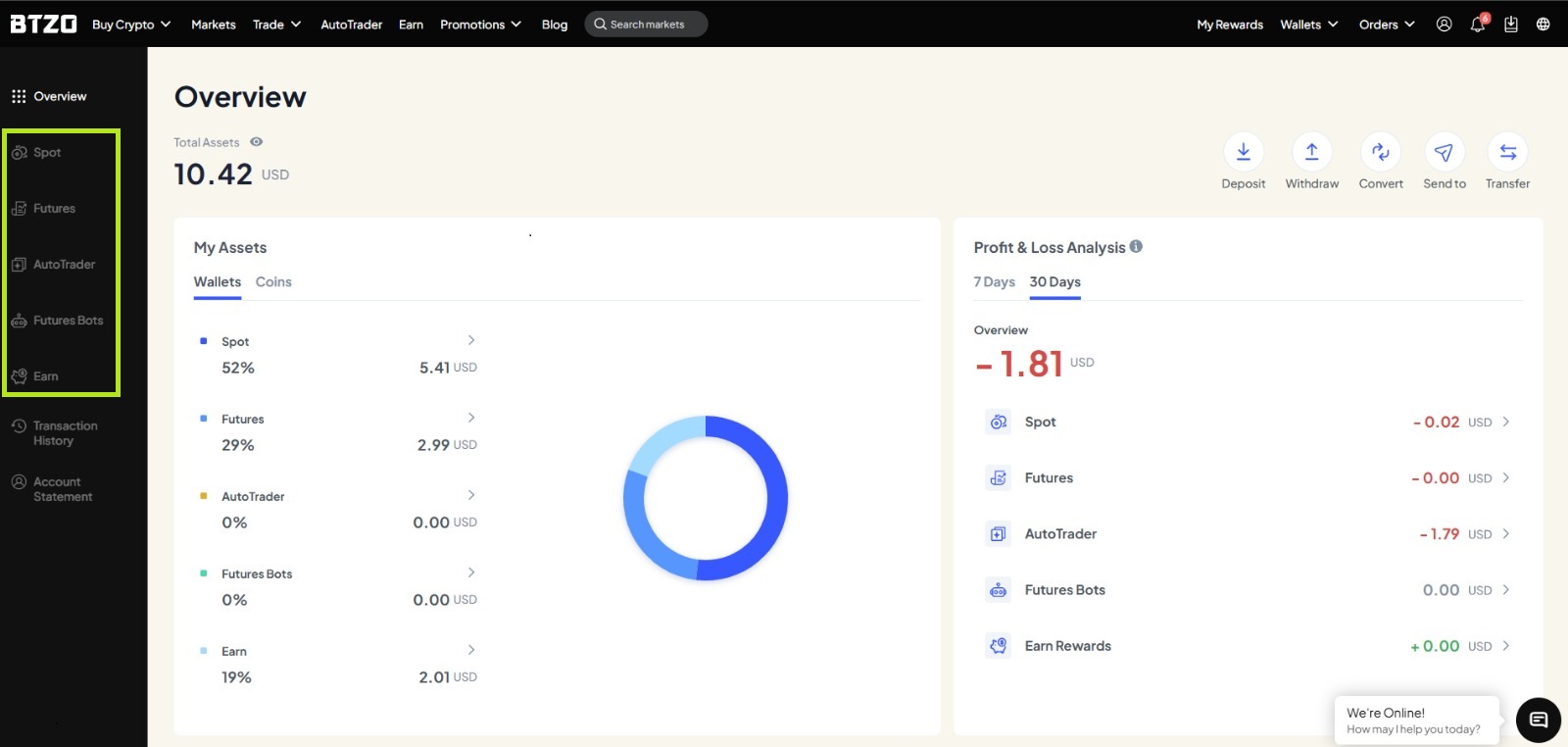
Spot Wallet:
This is your main wallet for buying, selling, and holding crypto. The assets you see here are your available holdings.
Futures Wallet:
If you trade futures, click on this section to see the balance you have allocated for futures trading. This is separate from your spot funds to help with risk management.
Earn Wallet:
If you are participating in staking or savings products, navigate here to see your locked assets and earned rewards.
AutoTrader:
This wallet displays the amount that you have invested in the autotrader option. It shows the percentage that you have used out of your total wallet balance
By checking these sub-wallets, you can understand exactly where your money is and what it’s doing.
Step 5: Analyze Your Assets
Take a moment to analyze the information. You can see:
- The current market price of each of your coins.
- The 24-hour change in the value of your holdings.
- The distribution of your portfolio.
Monitoring this regularly helps you track your performance and manage your investments wisely. The BTZO app makes this especially convenient, allowing you to check your BTZO assets status on the go, anytime.
Winding Up
It is essential to keep track of your cryptocurrency investments. Observation of how your portfolio is performing is a good start. As we’ve clarified, checking your BTZO assets is a simple, secure activity that provides you with everything you want to know, from your overall net worth on the platform to the details of your available funds and amounts locked. Adding the habit of frequently checking your wallet on the BTZO app or website to your routine gives you the power to make better, timelier trading and investment decisions. Your money clarity is just a click away.