


Everything on a crypto exchange starts with getting funds in – and ends with getting them out safely. Before you trade, stake, or earn anything on BTZO, you need to know how to deposit and withdraw crypto on BTZO correctly. One wrong step – the wrong network, a mistyped address – can cost you funds with no way to recover them.
The guide explains all steps needed for completing both deposits and withdrawals together with the necessary pre-sending checks and methods for maintaining security throughout the entire process. The system requires complete understanding of its components because it uses no simplified language and lacks any quick methods.
When Do Traders Deposit Crypto on BTZO?
Depositing isn’t only for when you’re just starting out. These are the common situations:
- Funding a new account. You need a balance in your spot wallet before you can place any trade.
- Consolidating from another exchange. Moving assets across to access BTZO’s trading tools, AutoTrader strategies, or Earn products.
- Secure storage. Some users prefer holding on BTZO’s wallet infrastructure instead of managing their own cold storage.
- Reacting to market conditions. A quick top-up when an opportunity arises and your balance is running low.
When Do Traders Withdraw Crypto from BTZO?
Withdrawals are a routine part of using any exchange. Common reasons:
- Taking profits. Moving gains to a personal wallet or another platform after closing trades.
- Cold storage. Sending crypto to a hardware wallet like Ledger or Trezor for long-term offline safekeeping.
- Switching exchanges. Moving funds elsewhere to access different pairs or trading conditions.
- Direct payments. Sending crypto to another person or address outside BTZO.
Things You Must Check Before Sending Crypto
Most lost funds come down to one of these. Read this section before you touch anything.
1. Wallet Address
Copy the deposit address from BTZO – never type it by hand. One wrong character sends funds to an address nobody controls. After pasting, compare the first and last four characters against the original.
2. Blockchain Network
This is where most mistakes happen. USDT runs on multiple networks – ERC20, TRC20, BEP20, and others. Send via TRC20 to an ERC20 address and the funds don’t arrive. They’re gone. The network selected on BTZO must match the network your external wallet uses to send.
Networks available on BTZO:
| Network | Common Tokens | Speed | Best For |
|---|---|---|---|
| Ethereum (ERC20) | USDT, ETH, USDC | ~15 confirmations | Most widely supported |
| Tron (TRC20) | USDT (TRC20) | ~15 confirmations | Low fees for USDT |
| BNB Smart Chain (BEP20) | BNB, BEP-20 tokens | ~15 confirmations | Fast and cheap |
| Solana (SPL) | SOL, SPL tokens | Fast | High-speed transfers |
| Polygon | MATIC, ERC tokens | Fast | Low gas, EVM-compatible |
3. Minimum Deposit Amount
BTZO sets minimum thresholds per token and network. For USDT on ERC20, the minimum deposit is 5 USDT. Anything below that may not credit to your account.
4. Supported Coins
Before depositing a lesser-known token, check the BTZO markets page to confirm it’s supported. Not every token is available on every network.
5. Network Fees
Gas fees go to the blockchain, not to BTZO. They’re deducted from your sending wallet. ERC20 fees can spike during high traffic. TRC20 is usually the cheapest option for USDT.
How to Deposit Crypto on BTZO Exchange
Log in to your BTZO account. If you haven’t registered yet, it takes under two minutes – no KYC required.
Step 1 – Go to Your Spot Wallet
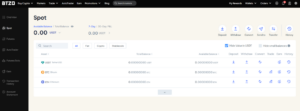
Click Wallets in the top menu and select Spot. Your available balances for USDT, BTC, ETH, and any other assets appear here.
Step 2 – Click Deposit
You should use the Deposit button which appears at the top of your Spot wallet interface. The deposit icon next to each asset in your asset list serves as another option to initiate a deposit.

Step 3 – Select Your Cryptocurrency
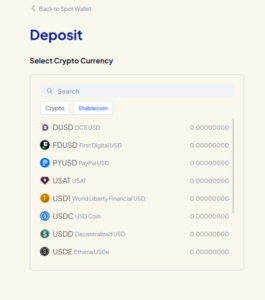
A search screen appears with two tabs: Crypto and Stablecoin. Find the token you want to deposit – for example, search for USDT under Stablecoin, or BTC under Crypto. Tap or click the token to proceed.

Step 4 – Choose Your Network
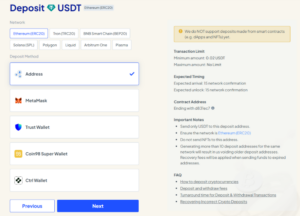
After selecting the token, pick the blockchain network. You will find USDT available through six different networks which include ERC20, TRC20, BEP20, Solana (SPL), Polygon, and Arbitrum One and Liquid and Plasma. You should select the option which corresponds with your intended method of transferring funds from your external wallet.
Step 5 – Choose Your Deposit Method
Two options are available:
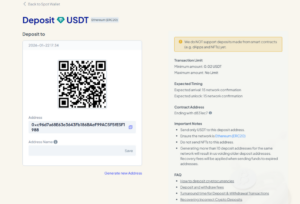
- Address. BTZO generates a wallet address. Copy it or scan the QR code and paste it into your external wallet.
- Connected wallet. MetaMask, Trust Wallet, Coin98, and Ctrl Wallet can connect directly, removing the need to copy any address.

Step 6 – Deposit and Wait
Initiate the transfer from your external wallet. Deposits credit in a seconds. You’ll get a notification when funds land in your spot wallet. On Ethereum, this can take longer during congestion. Tron and BNB Smart Chain are usually faster.

Read more: How to Deposit Crypto in BTZO Wallet – Step by Step Guide
How to Withdraw Crypto BTZO Exchange
Step 1 – Go to Your Spot Wallet
Navigate to Wallets → Spot. Before you start, make sure 2FA is active on your account – it’s required to complete any withdrawal.
Step 2 – Click Withdraw
Hit the Withdraw button at the top of the wallet page, or click the withdraw icon next to the specific asset you want to send out.

Step 3 – Select Your Cryptocurrency and Network
Choose the token you want to withdraw, then select the network. The same rule as deposits applies: the network must match the receiving wallet. For USDT on ERC20, the minimum withdrawal is 10.7671 USDT with no upper limit.
Step 4 – Enter Address and Amount
Paste the destination wallet address. Do not type it. Enter the amount you want to send. BTZO lets you save frequently used addresses under Saved Addresses – worth setting up to reduce errors on future withdrawals.
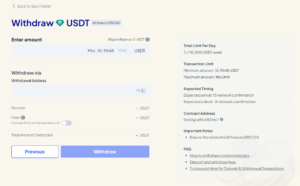

Step 5 – Verify and Confirm
BTZO sends a verification code to your registered email. You must enter the code together with your 2FA code before you can press Confirm. The system will display a success message after completion of processing. The funds will be delivered after the blockchain confirms the transaction.
Safety Tips Every Crypto User Should Follow
- Enable 2FA before anything else. BTZO requires it for withdrawals. Use Google Authenticator or Authy – not SMS-based codes.
- Test with a small amount first. Sending to a new address for the first time? Send a tiny amount, confirm it arrives, then send the rest.
- Check for clipboard hijacking. Malware can silently swap a copied address with an attacker’s. Always compare the first and last four characters of any pasted address before confirming.
- Don’t reuse expired deposit addresses. BTZO keeps the last 10 deposit addresses active per network. Sending to an older address may trigger a recovery fee.
- Verify the contract address. BTZO shows the contract address ending for each supported token (e.g., USDT on ERC20 ends in d831ec7). Use this to confirm you’re depositing a real token, not a fake one with the same name.
Advantages of Depositing and Withdrawing on BTZO
- Fast processing. Deposits credit after 15 network confirmations. Withdrawals go through promptly once verification is complete.
- Wide network support. ERC20, TRC20, BEP20, Solana, Polygon, Arbitrum, Liquid, and Plasma – more flexibility than most exchanges offer.
- Direct wallet connection. MetaMask, Trust Wallet, and Coin98 connect straight to the deposit flow – no address copying needed.
- Security by default. 2FA is mandatory for withdrawals, and real-time notifications go out for every account transaction.
- Clear interface. Every deposit and withdrawal screen shows transaction limits, expected timing, and important warnings upfront – before you confirm anything.
- No KYC. You can deposit and withdraw crypto on BTZO without any identity verification. Registration is fast and frictionless.
Once your spot wallet is funded, you’re ready to trade on BTZO spot trading, earn yield through BTZO Earn, or run automated strategies with BTZO AutoTrader.
Final Thoughts
Deposits and withdrawals sound simple – and they are, once you’ve done them correctly. The risk is real though, and it comes almost entirely from picking the wrong network or pasting the wrong address. Get those two things right and the rest is just a few clicks.
BTZO’s wallet interface makes it straightforward: clear network labels, contract address verification, multiple wallet connection options, and real-time confirmations. Start with a small test deposit, get comfortable with the flow, and go from there. Ready to get started? Head to BTZO and fund your account.
Also read: How to deposit and withdraw in BTZO Futures Trading
Register on BTZO today and complete your first deposit – no KYC required, funds settle directly to your spot wallet, and you can start trading within minutes.
FAQs
1. Do I need KYC to deposit and withdraw crypto on BTZO?
No. BTZO doesn’t require identity verification to deposit or withdraw. You can register, fund your wallet, trade, and send funds out without submitting any documents.
2. What happens if I send crypto to the wrong network?
The funds don’t arrive. In most cases they can’t be recovered. Always confirm the network matches on both the BTZO side and your sending wallet before you confirm anything. When in doubt, start with a small test transfer.
3. How long does a BTZO deposit take?
Most deposits credit after 15 network confirmations – usually a few minutes. Ethereum can take longer during congestion. Tron and BNB Smart Chain are typically faster. BTZO sends a notification as soon as your deposit is credited.